

Stop guessing auto scaling targets for TTS on Amazon SageMaker AI
Amazon SageMaker AI introduces a data-driven approach to auto-scaling for text-to-speech models, reducing guesswork and optimizing resource usage.
“By leveraging real-time measurements, teams can now avoid the pitfalls of guesswork, ensuring efficient resource allocation and improved application performance.”
Key takeaways
- Amazon SageMaker AI introduces a data-driven auto-scaling policy for TTS models.
- The methodology utilizes Q_max and T_total metrics for accurate scaling decisions.
- Kokoro-82M serves as the model for implementing this new approach.
- The change aims to reduce GPU spending and prevent latency breaches.
- Teams can expect improved performance and cost efficiency in their TTS applications.
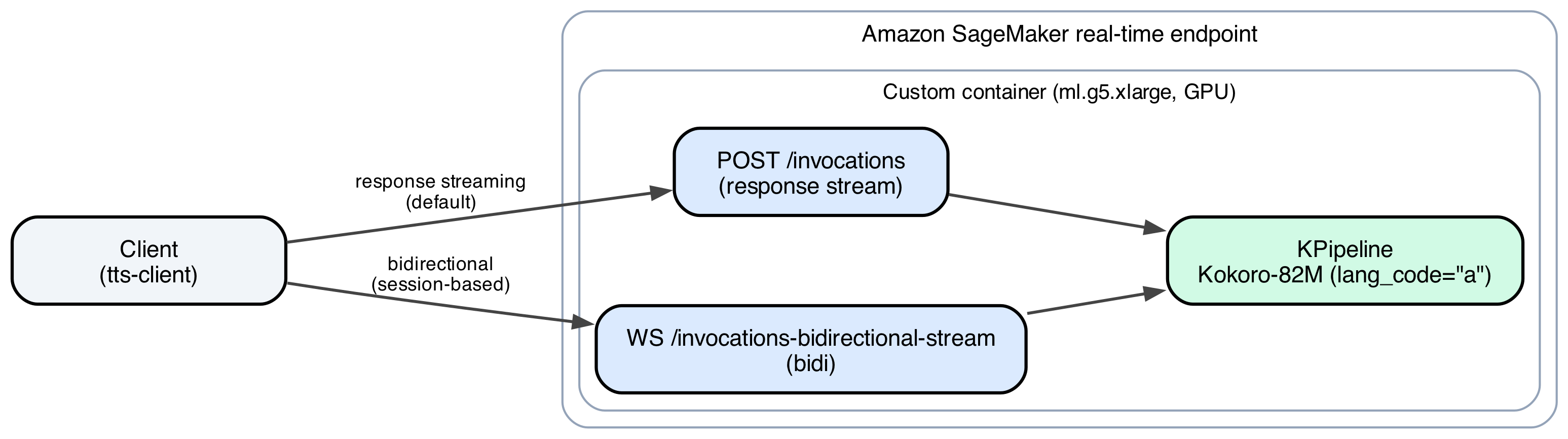
In a notable advancement for teams utilizing Amazon SageMaker AI, the platform has introduced a new method for determining auto-scaling targets for custom text-to-speech (TTS) models. Traditionally, developers faced the challenge of estimating the appropriate thresholds for auto-scaling, often leading to either excessive GPU spending or failure to meet latency service level objectives (SLOs). The new approach leverages real-time measurements from deployed models, specifically utilizing Kokoro-82M, to derive a more accurate and efficient auto-scaling policy. This shift not only enhances performance but also significantly reduces operational costs associated with over-provisioning resources.
The implementation of this method is particularly relevant as the demand for TTS applications continues to grow across various sectors, from customer service automation to content creation. By employing a measured approach to auto-scaling, teams can ensure that their applications remain responsive and cost-effective. The reliance on empirical data rather than guesswork marks a significant evolution in how machine learning models are managed in production environments. This change is expected to resonate with developers who have long struggled with the complexities of resource allocation in cloud environments.
Key facts
| Field | Detail |
|---|---|
| Model Used | Kokoro-82M |
| Platform | Amazon SageMaker AI |
| Methodology | Data-driven auto-scaling policy |
| Key Measurements | Q_max, T_total |
| Impact | Reduces GPU spending and latency breaches |
| Target Users | Teams deploying custom TTS models |
| Release Date | October 2023 |
| Primary Benefit | Optimized resource allocation |
Who's involved
The primary player in this development is Amazon Web Services (AWS), which provides the SageMaker AI platform. The Kokoro-82M model, a custom TTS model, is central to the new auto-scaling methodology. AWS's continuous efforts to enhance its machine learning services reflect its commitment to providing robust tools for developers and enterprises.
The introduction of this data-driven approach to auto-scaling comes at a time when the landscape of machine learning deployment is rapidly evolving. As organizations increasingly adopt AI technologies, the need for efficient resource management becomes paramount. Prior to this advancement, many teams resorted to trial-and-error methods to determine scaling thresholds, often leading to inefficiencies. The new methodology offers a structured alternative that is both practical and scalable.
In the past, developers faced a daunting task when deploying TTS models. The complexity of predicting user demand and adjusting resources accordingly often resulted in either underutilization or overutilization of GPU resources. This not only impacted performance but also strained budgets, especially for startups and smaller enterprises. The introduction of Kokoro-82M as a custom container provides a fresh perspective on how TTS models can be deployed more effectively, leveraging real-time data to inform scaling decisions.
How to read the numbers
While the article does not provide specific numerical benchmarks for the Kokoro-82M model, it emphasizes the importance of two key metrics: Q_max and T_total. These metrics are critical in determining the optimal auto-scaling thresholds. Q_max refers to the maximum queue length that the model can handle before latency begins to increase, while T_total represents the total processing time for requests. By analyzing these metrics, teams can make informed decisions about when to scale up or down, ensuring that their applications remain responsive without incurring unnecessary costs.
What you can do with it
- Implement the new auto-scaling policy using Q_max and T_total metrics to optimize resource allocation.
- Monitor the performance of Kokoro-82M in real-time to adjust scaling thresholds dynamically.
- Evaluate the cost savings achieved through the new methodology and adjust budgets accordingly.
- Share insights and best practices with other teams deploying TTS models to foster a community of learning.
What we're watching
As this new auto-scaling approach gains traction, it will be interesting to observe how teams adapt their deployment strategies. The effectiveness of the Kokoro-82M model in real-world applications will be a key indicator of its success. Additionally, AWS's ongoing enhancements to SageMaker AI may lead to further innovations in resource management for machine learning models. The industry will be keenly watching for any updates or new features that AWS may introduce to complement this development.
Looking ahead, the implications of this new auto-scaling methodology extend beyond just TTS models. As more organizations adopt machine learning technologies, the need for efficient resource management will become increasingly critical. The success of Kokoro-82M could pave the way for similar approaches across various AI applications, potentially transforming how developers approach scaling in cloud environments. This shift could lead to a more sustainable and cost-effective future for machine learning deployments, allowing teams to focus on innovation rather than operational overhead.
Source: AWS Machine Learning · Read original →
Instagram & TikTok: copy the link or quote and paste into a Story, Reel, or caption.
Digest
AI news by email
Weekly Friday briefings plus midweek notes when models or research drop. Sources included — unsubscribe anytime.
Discussion
Comment here after signing in, or share the story to continue the conversation elsewhere.
Instagram & TikTok: copy the link and paste into a Story, Reel, or caption.
Log in or create an account to comment — Google / GitHub / X when those providers are configured.
No comments yet — start the thread.


