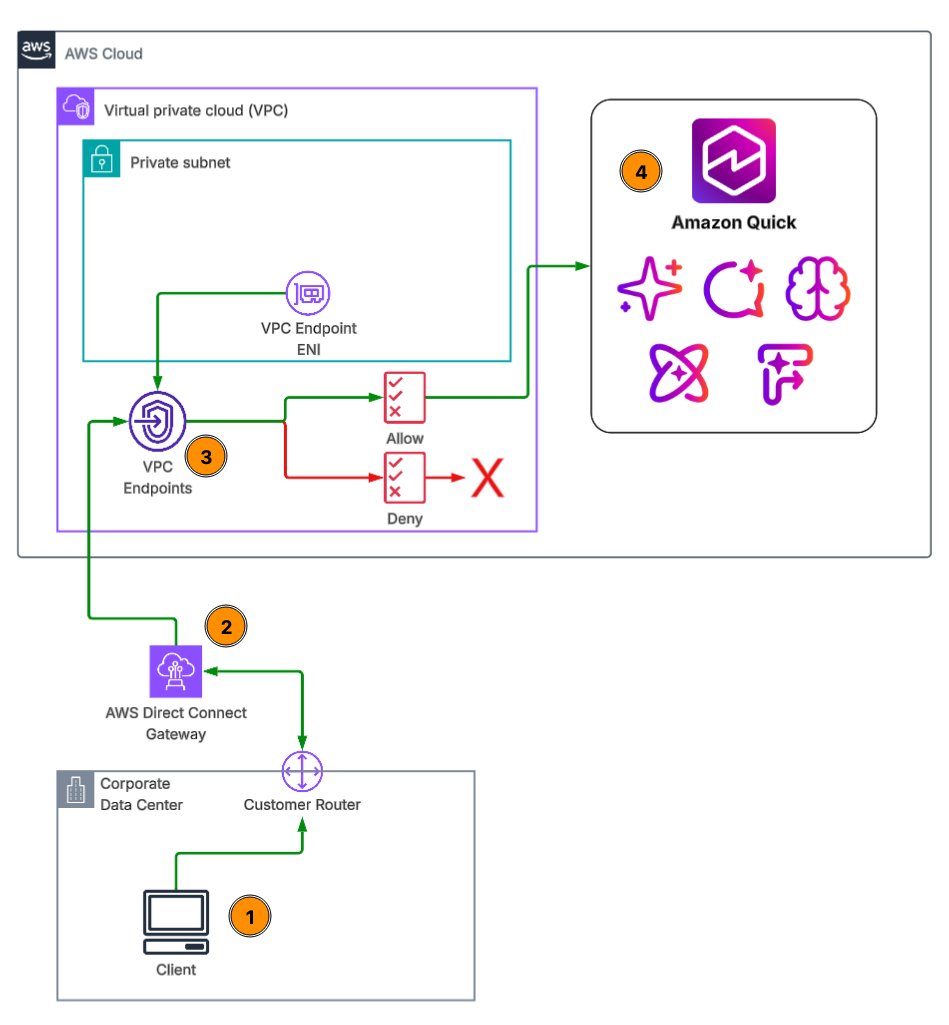
Securing Quick access from corporate networks with AWS PrivateLink
AWS introduces PrivateLink to enhance secure access to Amazon Quick from corporate networks, ensuring data privacy and compliance.
Amazon Web Services (AWS) has unveiled a new feature designed to bolster the security of data analytics workflows by enabling private connections between on-premises data sources and Amazon Quick. This initiative leverages AWS PrivateLink, a service that allows users to connect their Virtual Private Cloud (VPC) to AWS services without exposing traffic to the public internet. By keeping analytics traffic off the public network, organizations can mitigate potential security risks associated with data breaches and unauthorized access. The introduction of this feature is particularly timely as businesses increasingly prioritize data privacy and compliance in their operations.
The AWS PrivateLink service facilitates a seamless connection to Amazon Quick, allowing users to access their data securely while adhering to stringent compliance requirements. This walkthrough covers essential components such as VPC endpoints for user and API access, VPC connections for data sources, DNS and endpoint policies, identity federation, and the enforcement of VPC-endpoint-only access. By implementing these features, organizations can ensure that their data remains protected while still being accessible for analytics purposes.
Key facts
| Field | Detail |
|---|---|
| Service | AWS PrivateLink |
| Purpose | Securely connect on-premises data sources to Amazon Quick |
| Key Features | VPC endpoints, DNS policies, identity federation |
| Compliance | Enforces VPC-endpoint-only access |
| Target Users | Enterprises with sensitive data requirements |
Who's involved
The key players in this initiative include Amazon Web Services, the parent company of AWS, which has been at the forefront of cloud computing and data services. Additionally, enterprises across various sectors that handle sensitive data, such as finance, healthcare, and government, are the primary beneficiaries of this new feature. By utilizing AWS PrivateLink, these organizations can enhance their data security posture while leveraging the powerful analytics capabilities of Amazon Quick.
Background
AWS PrivateLink was introduced to address the growing need for secure data access in cloud environments. Traditionally, organizations faced challenges when connecting their on-premises data sources to cloud services, as this often involved exposing sensitive information to the public internet. The introduction of PrivateLink marked a significant shift in how businesses could securely access cloud resources without compromising data integrity.
Prior to the implementation of AWS PrivateLink, organizations had to rely on Virtual Private Network (VPN) connections or Direct Connect services, which, while secure, could be complex and costly to manage. The new feature simplifies this process by allowing users to create private endpoints within their VPC, thus eliminating the need for public IP addresses and reducing the attack surface. This change is particularly relevant in an era where data breaches and cyber threats are increasingly common, prompting organizations to seek more robust security measures.
How to read the numbers
While the announcement does not provide specific performance metrics, the implications of using AWS PrivateLink can be assessed through qualitative benefits. Organizations can expect reduced latency and improved data transfer speeds due to the private connectivity. Additionally, the security enhancements offered by PrivateLink can lead to lower risks of data breaches, which can be quantified in terms of potential cost savings from avoided incidents.
What you can do with it
- Establish secure connections: Set up VPC endpoints to connect your on-premises data sources to Amazon Quick without exposing data to the public internet.
- Implement compliance measures: Utilize endpoint policies and identity federation to enforce compliance with internal and external regulations.
- Optimize analytics workflows: Leverage the secure connection to enhance data analytics capabilities while maintaining data privacy.
- Reduce operational complexity: Simplify network architecture by eliminating the need for complex VPN configurations or public IP addresses.
What we're watching
As AWS continues to roll out PrivateLink, we will be monitoring how organizations adopt this feature and the impact it has on their data security practices. Additionally, the response from competitors in the cloud services space will be crucial, as they may introduce similar features to retain their market share. The effectiveness of AWS PrivateLink in real-world scenarios will also be a focal point, particularly in industries with stringent compliance requirements.
The introduction of AWS PrivateLink represents a significant advancement in securing data access for organizations leveraging Amazon Quick. As businesses increasingly rely on cloud services for their analytics needs, the ability to connect securely to on-premises data sources will become a critical component of their data strategy. The emphasis on compliance and data privacy not only addresses current market demands but also positions AWS as a leader in providing secure cloud solutions.
In conclusion, the rollout of AWS PrivateLink for Amazon Quick is a pivotal moment for enterprises seeking to enhance their data security while leveraging cloud analytics. As organizations navigate the complexities of data management and compliance, the ability to connect securely to their data sources will be paramount. The ongoing developments in this space will be closely watched, as they will likely shape the future of secure cloud computing.
Source: AWS Machine Learning · Read original →
Instagram & TikTok: copy the link and paste into a Story, Reel, or caption.
Digest
AI news by email
Weekly Friday briefings plus midweek notes when models or research drop. Sources included — unsubscribe anytime.
Discussion
Comment here after signing in, or share the story to continue the conversation elsewhere.
Instagram & TikTok: copy the link and paste into a Story, Reel, or caption.
Log in or create an account to comment — Google / GitHub / X when those providers are configured.
No comments yet — start the thread.