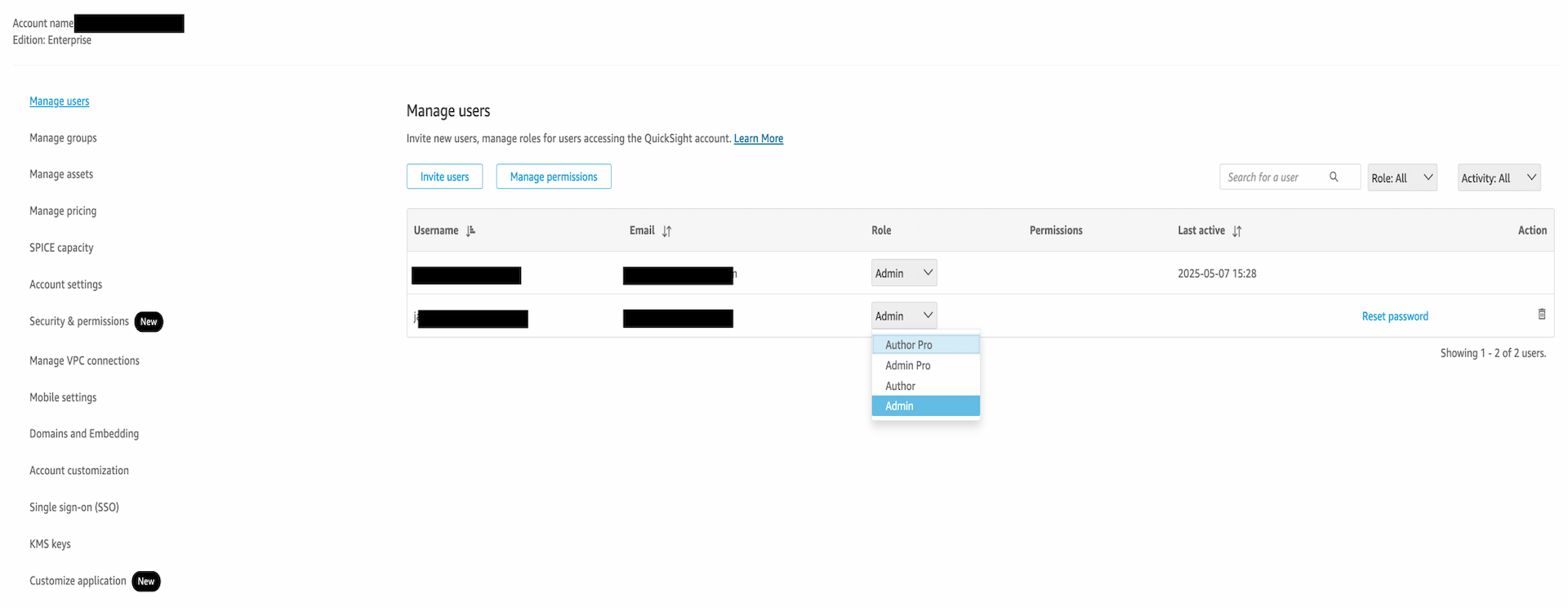
Downgrading user roles in Amazon Quick
Amazon Quick introduces methods to safely downgrade user roles, ensuring asset ownership remains intact while managing permissions effectively.
“AWS introduces new methods for downgrading user roles in Amazon Quick, ensuring asset ownership remains intact while enhancing security.”
Key takeaways
- Amazon Quick now offers two reliable methods for downgrading user roles.
- The manual delete-and-recreate method requires careful execution to avoid data loss.
- The AWS CLI step-down sequence preserves asset ownership during role changes.
- Regular audits of user roles can enhance security and compliance.
- Understanding these methods is crucial for effective data management in AWS.
Amazon Web Services (AWS) has recently addressed a common challenge faced by users of Amazon Quick, their business intelligence service. Users often find themselves needing to downgrade permissions from higher roles such as Admin or Author to a more restricted Reader role. This is particularly relevant for organizations that prioritize security and need to ensure that only specific individuals have access to sensitive data. The absence of a direct console path for this action has led to confusion and potential risks, prompting AWS to provide clear guidance on how to navigate this process effectively.
The post outlines two reliable methods for downgrading user roles in Amazon Quick. The first method involves a manual delete-and-recreate approach, which, while straightforward, requires careful execution to avoid loss of asset ownership. The second method utilizes the AWS Command Line Interface (CLI) to perform a step-down sequence that downgrades roles while preserving the ownership of assets. This dual approach not only enhances user experience but also reinforces AWS's commitment to security and user control over data access.
Key facts
| Field | Detail |
|---|---|
| Service | Amazon Quick |
| Role Types | Admin, Author, Reader |
| Methods for Downgrade | Manual delete-and-recreate, AWS CLI step-down |
| Focus | Preserving asset ownership during role changes |
| Importance | Enhances security and user management |
| Date of Announcement | October 2023 |
| Target Audience | AWS users managing permissions in Quick |
| Documentation Type | Official AWS blog post |
| User Experience | Simplified role management |
| Security Implications | Reduces risk of unauthorized access |
Who's involved
The primary player in this scenario is Amazon Web Services (AWS), a subsidiary of Amazon that provides on-demand cloud computing platforms and APIs to individuals, companies, and governments. Within AWS, Amazon Quick serves as a vital tool for organizations looking to analyze and visualize their data effectively. The guidance provided in the blog post reflects AWS's ongoing efforts to enhance user experience and security across its services.
Background
Amazon Quick has been an integral part of AWS's suite of cloud services since its launch, designed to empower users with the ability to create visualizations and perform data analysis without needing extensive technical expertise. However, as organizations grow and evolve, so do their data management needs. The ability to adjust user roles is crucial for maintaining a secure environment where sensitive information is protected from unauthorized access.
Previously, users faced challenges when attempting to downgrade roles due to the lack of a straightforward method in the AWS Management Console. This limitation often led to frustration, as users were unsure how to proceed without risking the loss of important data or ownership rights. The introduction of these two methods marks a significant improvement in the user experience, allowing for more flexible and secure management of user permissions.
The manual delete-and-recreate method, while effective, requires users to be diligent. It involves deleting the existing user role and creating a new one with the desired permissions. This process can be time-consuming and may lead to temporary loss of access to certain features or data. On the other hand, the AWS CLI step-down sequence offers a more streamlined approach, allowing users to downgrade roles without the need for deletion, thus preserving asset ownership and minimizing disruption.
How to read the numbers
While the blog post does not provide specific numerical benchmarks or scores, it emphasizes the importance of user role management in enhancing security and operational efficiency. The focus is on the qualitative benefits of the two methods provided, which aim to simplify the process of managing user permissions in Amazon Quick. The implications of these changes can be significant for organizations that rely on AWS for their data analytics needs.
What you can do with it
- Review your current user roles in Amazon Quick to identify any necessary downgrades.
- Choose between the manual delete-and-recreate method or the AWS CLI step-down sequence based on your team's technical expertise.
- Ensure that asset ownership is preserved during the downgrade process to maintain data integrity.
- Regularly audit user roles and permissions to enhance security and compliance within your organization.
What we're watching
As AWS continues to refine its services, the next milestone will likely involve further enhancements to user management features in Amazon Quick. The introduction of more intuitive interfaces or automated processes for role management could significantly reduce the complexity of these tasks. Additionally, AWS's ongoing commitment to security will be critical as organizations increasingly rely on cloud services for sensitive data management.
Looking ahead, AWS's focus on user experience and security will shape the future of Amazon Quick and other services. As organizations adapt to evolving data management needs, the ability to efficiently manage user roles will remain a top priority. The successful implementation of these new methods could set the stage for further innovations in user management across AWS's suite of services, ultimately enhancing the overall cloud experience for users worldwide.
Source: AWS Machine Learning · Read original →
Instagram & TikTok: copy the link or quote and paste into a Story, Reel, or caption.
Digest
AI news by email
Curated stories with sources and takeaways. Confirm once — unsubscribe anytime.
Discussion
Comment here after signing in, or share the story to continue the conversation elsewhere.
Instagram & TikTok: copy the link and paste into a Story, Reel, or caption.
Log in or create an account to comment — Google / GitHub / X when those providers are configured.
No comments yet — start the thread.